Home › Guides › YouTube to sheet music
How to turn a YouTube piano video into sheet music
Many of the best piano covers and arrangements on YouTube come without a score. Here is how to get one from the video: the notes for both hands, a readable score you can print, and a falling-notes piano roll to practise with.
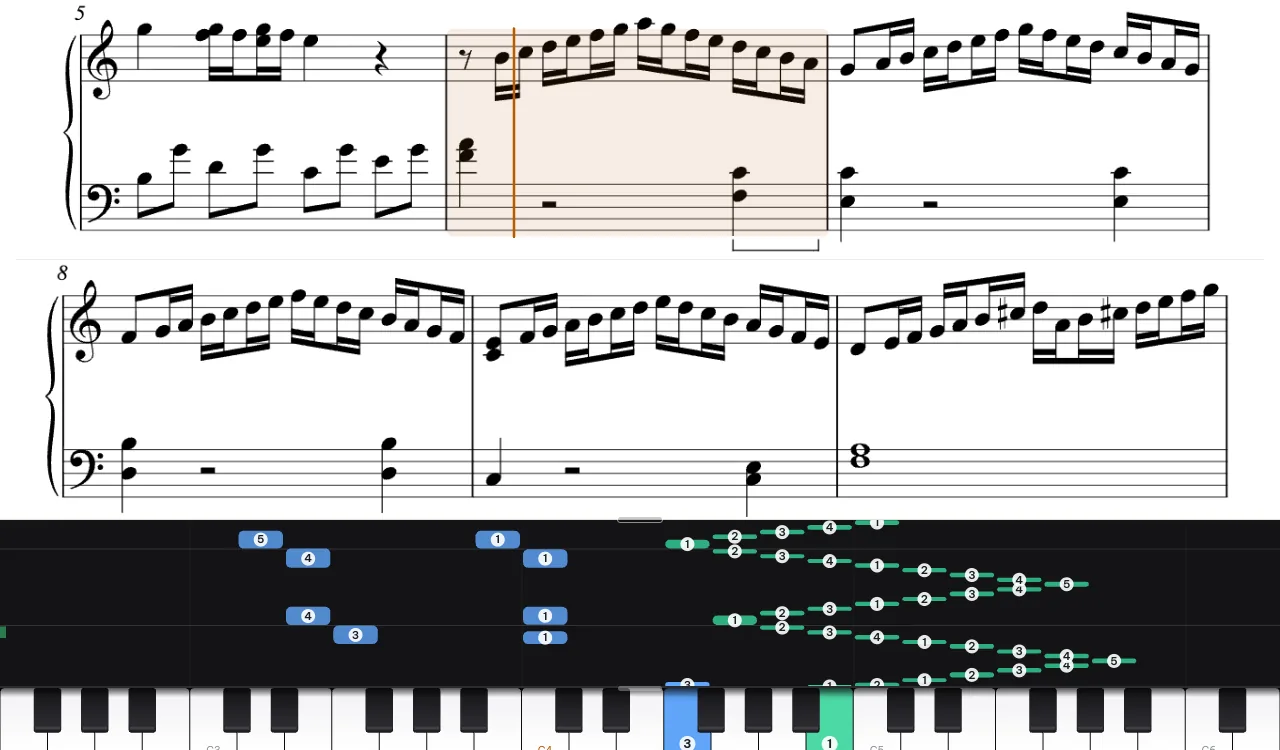
Step by step
- Copy the link of the video. A link from a playlist or a mix is fine: only that video is used. Pieces of up to 10 minutes on the free plan, 20 minutes on Plus and Pro.
- Paste it in the app. Press + Add song, paste the link into the field Paste a YouTube link to a piano video…, tick the box and press Record the video's sound.
- Record the video's sound. Open the video on YouTube, come back and press Record, choose the YouTube tab and keep Also share tab audio on. Then play the video from the start. Your browser records the sound you hear, and the recording stops by itself a few seconds after the music. This works in Chrome and Edge on a computer; nothing is downloaded from YouTube.
- Wait while it is transcribed. The recording is turned into notes, then into beats, bars and a score. A three-minute piece takes from about half a minute to a couple of minutes.
- Listen and compare. In the Sound settings, switch Listen to between The original recording and Piano from the notes to hear where the notes differ.
- Fix the bar lines if they drift. In Settings, under This song, press Tap the beat to fix the measures, listen to the recording and tap the space bar on every beat for two to four bars, starting on beat one. The app takes the tempo and the downbeats from your taps and redraws the score.
- Correct notes and hands. Turn on Edit notes (under This song): drag a note to move it, change its length, move it to the other hand, add or delete notes.
- Print or export. Sheet PDF opens the score to print or save as a PDF; MusicXML opens in MuseScore and other notation programs; MIDI goes to any keyboard or DAW.
What the score looks like
The transcription is written the way a printed score would be: one voice per hand, a key signature that fits the notes, treble or bass clef chosen bar by bar to keep ledger lines few, 8va for high passages, pedal marks under the left hand, and fast runs written out evenly in 32nd notes, even when they pass from one hand to the other. Each line of the score lights up as the music plays.
Tips for a good result
- Choose solo piano. Singing, other instruments or talking over the music make the notes less reliable.
- Check the hands with the video. The left and right hands are worked out from where the hands are on the keyboard; the video of the pianist is the best way to check a passage where both hands play close together.
- Treat rhythm as a draft. Notes and their timing are taken from the recording; the beats, bar lines and note values are an estimate, especially where the pianist plays freely.
On a phone, in Safari or in Firefox, a tab's sound cannot be recorded: upload an audio file of the piece instead, see MP3 to piano sheet music. Use only music you have the right to use.
Related guides
Have a video in mind?
Paste a link, record its sound, and see your piece as notes and a score.
Open the app